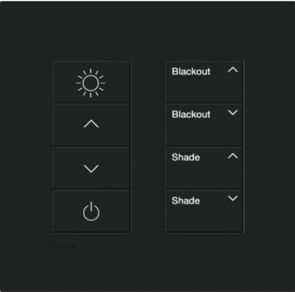
Up and down arrows: Allows you to adjust the brightness of the lighting
Power sign: Lights off
How to operate the shades
Blackout: Open and close shades
Shades: Open and close shades on the room side
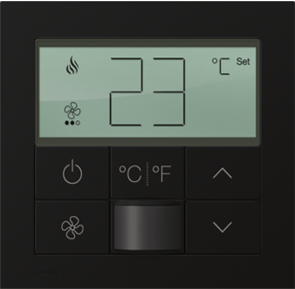
How to operate the air conditioner
Power sign: ON/OFF switch. The first one turns on the LCD. The second one operates ON/OFF
Fan sign: Fan mode changeover switch. Each pressing switches in the order of “low wind – medium wind – high wind – AUTO”.
˚C/ ˚F sign: Toggles between Celsius (°C) and Fahrenheit (°F) displays
Up and down arrows: Temperature control switch. Switches between upper limit of 30°C and lower limit of 18°C
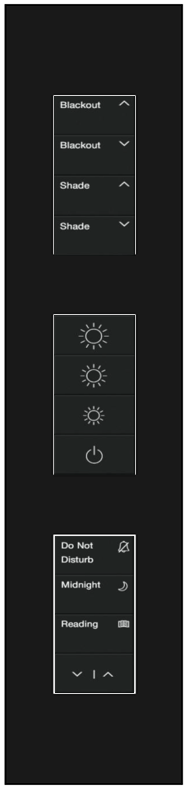
How to operate the night table panel
How to operate the shades
Blackout: Use the up and down arrows to open and close the shades on the blackout side of the room.
Shade: Open and close the shades on the room side using the up and down arrows.
How to operate the lights
Sign of light: controls dimming
Power sign: turns off the light
Other Operations
Do Not Disturb: This is a privacy button. When the button is pressed, the chime will not ring even if the hallway bell button is pressed. When the button is lit, no staff, including cleaning staff, will be present in the room.